To restock the noodle bar in Nivalis Nights, open the venue’s Shopping List, buy the listed ingredients from the appropriate market vendors, return to the restaurant, and transfer the food from your personal inventory into the venue’s storage. Buying an ingredient is not enough by itself: the noodle bar cannot use it while it remains in your carried inventory.
For the introductory noodle bar menu, the shopping list can direct you toward chicken, onions, and ramen noodles. The required quantities can change as the restaurant serves customers, so use the current in-game list instead of following a fixed set of numbers from an earlier day.
The important limitation is that the shopping list is an ongoing supply tool, not necessarily a one-time objective that permanently disappears. It may remain available after a delivery, and later manager activity does not make the list irrelevant. Confirm a successful restock by checking the venue inventory and watching whether the restaurant can continue preparing its active dishes.
Complete the noodle bar restock in five steps
- Open the Shopping List. The PC launch-build shortcut is
L. Select the noodle bar entry and note every ingredient and quantity currently requested. - Travel to the market. The opening restock route uses multiple nearby food vendors rather than a single shop for every ingredient.
- Buy the missing amounts. Onions and ramen noodles are shown at a produce vendor, while chicken is available from the butcher. Check freshness as well as price before confirming each purchase.
- Return to the noodle bar. Find the restaurant’s inventory or storage interaction rather than stopping after entering the venue.
- Transfer the ingredients into venue storage. Move the purchased food from your inventory to the restaurant container with the transfer controls. Reopen the venue inventory to confirm that the items are present.
If you are completing the introductory noodle bar objective, speak to Banor after filling the inventory when the objective tells you to return to him. The early quest dialogue confirms that the first delivery is intended to keep the business operating for the day, not stock it forever.
Check the noodle bar shopping list before you buy
The Shopping List is the safest source for the noodle bar’s immediate needs. Open it before leaving for the market, and compare its entries with the venue you intend to supply. This matters once you have more than one business because a useful ingredient at another restaurant may not solve the shortage at the noodle bar.
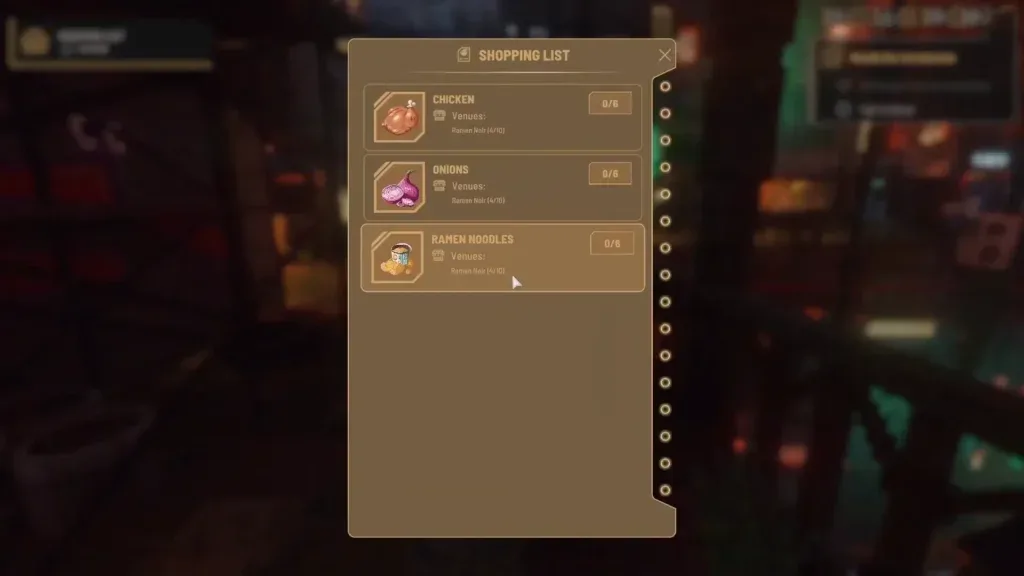
Read the list again immediately before purchasing if the bar has remained open while you travelled. Customers can consume ingredients during operating hours, so a quantity remembered from earlier may no longer match the current shortage. The list continues to update between restocking trips.
Do not treat the list as a complete menu planner. It tells you what the venue currently wants restocked, while the menu screen tells you which ingredients and equipment each active dish requires. Both views are useful, but they answer different questions:
| Screen | What it tells you | Best time to use it |
|---|---|---|
| Shopping List | Which ingredients the venue currently requests and how many are missing | Before and during a market trip |
| Venue inventory | What food is actually stored at the noodle bar | After transferring a delivery |
| Menu or recipe view | Which ingredients and equipment a selected dish requires | When stock exists but the dish still cannot be prepared |
A shopping-list entry can remain visible even when the restaurant is still functioning. Community reports from the launch build describe venues continuing to operate while the list stayed active or the low-stock warning remained. Use the list as a warning and buying guide, then verify the real situation in venue storage.
Buy the missing ingredients at the market
The initial noodle bar route demonstrates that different vendors carry different categories of food. The produce vendor offers items such as onions and ramen noodles, while the butcher carries chicken. If the first trade screen does not contain everything on the list, leave that vendor and check the other nearby food seller instead of assuming the item is unavailable.
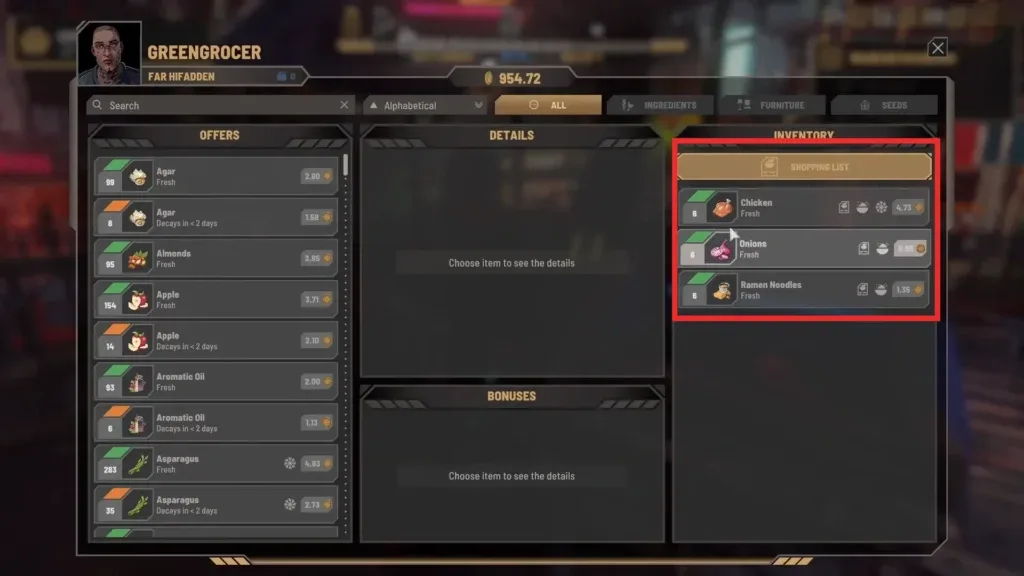
Vendor offers are not completely static. Market prices can change over time, relationships with vendors influence prices, and daily deals can appear. This means an old screenshot should not be used as a permanent price table. Compare the offers visible in your current trade window.
Freshness also changes the value of a purchase. A cheaper stack that decays soon may be reasonable when the noodle bar will consume it quickly, but it is a poor bargain if it sits unused and spoils. The game displays freshness or remaining decay time in the item information, so inspect that field before buying a large amount.
Use this buying order to avoid an incomplete trip:
- Pin down the current missing quantities from the Shopping List.
- Search or browse the produce vendor’s offers for the plant-based and noodle ingredients.
- Visit the butcher for meat such as chicken.
- Compare available stacks by freshness and price.
- Buy the requested amount, adding only a modest buffer when you have a clear reason to expect near-term demand.
- Check your carried inventory before leaving the market so that no listed ingredient was overlooked.
There is no verified universal stock target that works for every day. There is no verified optimal stock minimum for all menus or venues. Demand, active dishes, freshness, and operating time can all change what the noodle bar needs.
Transfer ingredients into venue storage
A purchase remains in your personal inventory until you deposit it at the business. Return to the noodle bar, interact with its storage or inventory, and switch to the view that shows both your carried items and the venue container. Select each purchased ingredient and use Transfer to Container or Transfer All, as appropriate.
After transferring, inspect the venue side of the interface. Chicken, onions, and ramen noodles should appear there when they are part of your delivery. This confirmation separates a completed restock from a shopping trip in which the supplies are still being carried around the city.
Some ingredients require refrigeration. The in-game storage explanation states that restaurants provide some storage and that capacity can be expanded by placing cabinets, shelves, fridges, and freezers. Item details indicate when an ingredient should be kept cold. Use suitable storage for those items instead of treating every container as interchangeable.
Player reports differ on whether the launch build reliably consumes older or newer stock first. Because that conflict is unresolved, do not build your supply plan around a guaranteed first-in, first-out rule. Check freshness yourself, avoid unnecessary surplus, and review stored stacks before another large purchase.
Make sure the menu can use the stock
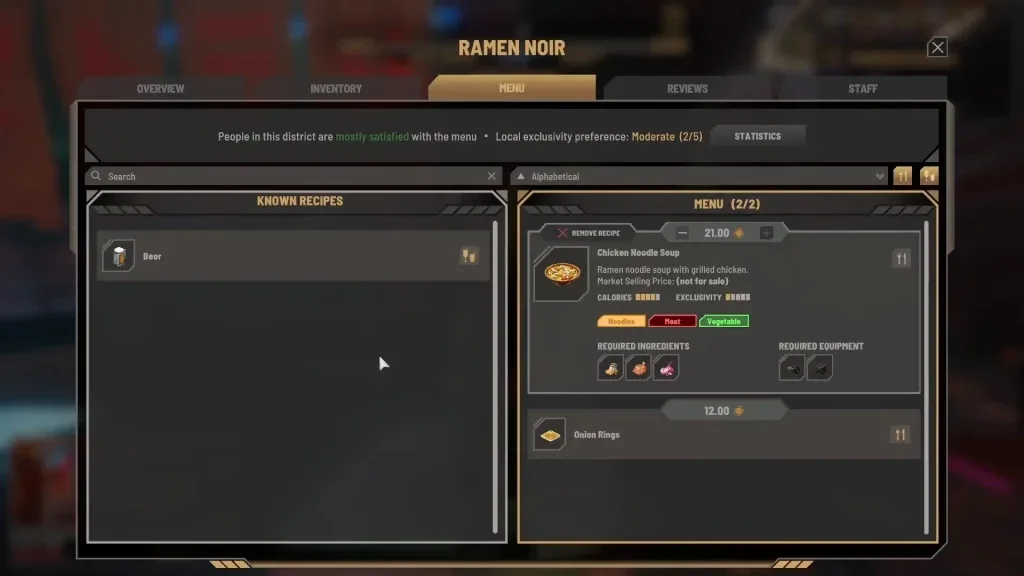
A full container does not help if the active dish needs different ingredients or missing equipment. Open the noodle bar’s menu and inspect the required ingredients for the dish you expect the staff to prepare. The introductory chicken noodle soup is shown alongside its ingredient requirements, and the same menu view also lists required equipment such as the food processor and cooker.
Use the following checks when the noodle bar appears stocked but service still stops:
- Confirm that the ingredients are in venue inventory, not your personal inventory.
- Confirm that the stocked ingredients match the currently active menu item.
- Check the recipe’s equipment requirements rather than buying more food automatically.
- Reopen the Shopping List to see whether customer demand created a new shortage after your delivery.
- Inspect ingredient freshness so that visible stock is not mistaken for dependable long-term supply.
Do not add every unlocked recipe merely to make stored ingredients useful. A broader menu creates more ingredient types to monitor. Players have reported that some players reduced operating pressure by keeping a focused menu, but it does not prove that menu size causes every restocking problem. Treat a smaller menu as a way to simplify purchasing, not as a confirmed repair for a broken system.
Use a repeatable daily restocking routine
The noodle bar consumes supplies while it serves customers, so restocking works best as a short operating loop rather than an occasional emergency trip.
Before opening or leaving the district
Check the active menu, venue inventory, and Shopping List together. Identify ingredients that are already low and note any stacks nearing decay. This gives you a clearer purchase plan than reading only the warning icon.
At the market
Buy for the dishes you are actually serving. Prefer quantities the restaurant can use while they remain fresh, especially when choosing discounted food with little time left before decay. Visit the correct specialist vendor when one shop does not carry the full list.
Back at the noodle bar
Deposit everything into venue storage and confirm the transfer. If the introductory objective remains active, follow its instruction to report back to Banor. Check that the menu’s required equipment is present before interpreting a service interruption as another ingredient shortage.
During service
Monitor the list and inventory rather than assuming the morning delivery will last all day. Early gameplay shows the noodle bar requesting another ingredient run after sales continue. A new shortage after several meals does not mean the earlier transfer failed; it can simply mean the restaurant used the stock.
At the end of the day
Review remaining freshness and business cash before buying another large buffer. Nivalis Nights autosaves at the end of each day, and manual saving is also available from the Pause Menu, so you can preserve your progress after completing the supply run.
Fix common noodle bar restock problems
Purchased food does not appear at the noodle bar
The food is probably still in your personal inventory. Buying and carrying an ingredient does not place it in the venue automatically. Interact with the restaurant storage and transfer the stack into the venue container, then verify it on the venue side of the inventory screen.
The Shopping List still appears after delivery
The list can remain as an ongoing restocking aid. Launch-build players report that it may not disappear even when the restaurant continues serving. Check the actual venue inventory, active recipe requirements, and business operation before repeating the entire purchase blindly.
One vendor does not sell a listed ingredient
Check the other market food vendors. The opening route separates produce and noodles from meat: the produce seller supplies items such as onions and ramen noodles, while the butcher supplies chicken. A marker pointing toward the market does not mean one trade window contains the complete order.
Ingredients run out shortly after restocking
Reopen the live Shopping List and compare it with the venue inventory. The restaurant can continue using ingredients while you travel or complete other tasks. Avoid relying on a memorized amount from a previous visit, but also avoid responding with an oversized purchase that may spoil before it is used.
Stock exists but the recipe is unavailable
Inspect the selected dish in the menu. A recipe can require both specific ingredients and specific kitchen equipment. More chicken, onions, or noodles will not solve a missing-equipment requirement or supply an entirely different dish.
Food spoils before the noodle bar uses it
Check freshness at the vendor, place ingredients in appropriate storage, and buy smaller batches until you understand the venue’s demand. A dependable stock-consumption order has not been verified, so manually watch older and less-fresh stacks instead of assuming the game will always use them first.
Treat manager restocking as assistance, not confirmation
A manager is not required for the early manual noodle bar restock. Managers become available when a venue reaches Level 3 and are intended to automate tasks including ingredient restocking, but players reported inconsistent behavior in the October 1, 2026 launch build. Reports include excessive buying, purchases of already plentiful items, and failure to obtain ingredients the venue actually needs.
The manager system and the Shopping List can operate at the same time. Seeing the list after hiring a manager does not by itself prove that the employee has done nothing, and seeing a restock message does not prove that every shortage is resolved. Check venue inventory, important ingredients, freshness, and business spending directly.
Business progression can increase the displayed Manager Efficiency statistic, but the exact effect of that percentage on purchasing decisions has not been verified. A higher-level manager is also not verified as a guarantee of correct orders. Until the system is more dependable, use manager activity as partial assistance and keep the manual shopping-and-transfer workflow available for critical shortages.