
A Manager in Nivalis Nights helps keep an individual venue operating while you are elsewhere. Managers can restock ingredients, support staff efficiency and morale, and use produce from your greenhouse. You can hire one after the venue reaches Level 3, then assign the Manager role and set the employee’s schedule through the venue staff interface.
The important launch-build limitation is that Manager automation is not consistently reliable. Players have reported excessive purchases, missing ingredients, orders for items already in stock, and food sitting unused until it spoils. Manager level and the displayed Manager Efficiency percentage do not currently provide a proven way to eliminate those problems. Treat a Manager as supervised automation: let the employee reduce routine work, but continue checking cash, inventory, and menu requirements yourself.
This guide reflects the October 1, 2026 launch-build snapshot. Manager behavior is version-sensitive because the developers have acknowledged problems with the system and are working on fixes.
Manager responsibilities at a glance
| Function | What the Manager can do | What you still need to monitor |
|---|---|---|
| Venue operation | Help keep a business running while you are away | Revenue, costs, staffing, and whether the venue remains profitable |
| Ingredient supply | Order ingredients used by the venue | Missing stock, excessive quantities, and unnecessary spending |
| Staff support | Improve worker efficiency and morale | Shift length, wages, worker happiness, and role coverage |
| Greenhouse supply | Collect and use produce grown for your businesses | Whether the available produce matches the active menu |
| Physical setup | Work within the venue you have prepared | Furniture, storage capacity, fridges, freezers, and other equipment |
A Manager belongs to one venue’s staff operation. The role does not replace your broader responsibility for designing the menu, furnishing the premises, reviewing the business balance, or deciding how much risk the venue can afford.
How to unlock and assign a Manager
Manager hiring becomes available when a venue reaches Level 3. This is the venue’s progression level, not the candidate’s personal Manager skill level and not your global Business Skill level. Keeping those values separate matters because they describe different parts of the system.
Once the venue qualifies, use its staff interface to hire and configure the employee:
- Open the venue management interface and go to the staff section.
- Review the available candidates, including their wages, working hours, and relevant skill values.
- Hire a worker without exceeding the venue’s current staff limit.
- Assign the Manager role to that employee.
- Set the employee’s shift and hourly wage.
- Check the resulting worker happiness rather than assuming the default schedule is sustainable.
- Confirm that the venue also has the cooks, waiters, and cleaners needed for its actual service workload.
Workers can be assigned one or more venue roles, and their skills improve over time. Shift length and hourly wage affect happiness, so Manager coverage is not simply an on-or-off upgrade. A long shift may keep automation active for more of the day, but it also changes labor cost and employee happiness. Choose coverage based on when the venue operates and when you expect to be away.
Hiring a Manager also does not remove equipment requirements. Ingredients need appropriate venue storage, and some require refrigeration. Restaurants provide some storage, but cabinets, shelves, fridges, and freezers expand it. Manager automation cannot compensate for a venue that lacks the physical capacity needed to hold what it orders.
Which work a Manager can automate
The main purpose of a Manager is to reduce repeated travel and micromanagement once you own businesses that compete for your time. The employee can keep the assigned venue operating while you explore the city, complete other tasks, or supervise another location.
Ingredient restocking is the most visible part of this role. The Manager evaluates the venue’s recipes and places orders through vendors. Managers can also use greenhouse produce, which may reduce how much of the menu has to be supplied through purchases. Staff support is another part of the role: Manager activity is associated with worker efficiency and morale rather than replacing cooks, waiters, or cleaners.
The venue interface gives you the information needed to supervise this automation. Its business summary shows gains, costs, and balance, while venue information includes seating, cleanliness, staffing, happiness, menu capacity, and inventory. Use those screens together. A full shelf does not prove the restaurant is healthy if the Manager spent more than the venue can recover, and a positive balance does not prove every active recipe has the ingredients it needs.
The safest expectation is that a Manager performs routine operations within the business you configured. The Manager does not choose your overall strategy, create storage space, furnish the restaurant, or guarantee that every purchase is economical.
How the shopping list differs from Manager orders
The shopping list and the Manager are separate systems with different targets. This distinction explains why the shopping list can continue reporting a requirement after the Manager has already placed an order.
An unofficial mod-author analysis indicates that the shopping list flags a menu ingredient when its quantity is below 10. A Manager does not simply purchase until every shopping-list value reaches 10. Instead, the Manager calculates an order from ingredient use per serving, a planned number of stocked servings, and a buffer. How the Manager chooses its planned serving target remains unresolved.
As a result, a Manager can increase an ingredient from one unit to six while the shopping list still reports that four more are required. That combination does not, by itself, prove that the Manager failed to deliver the order. It shows that the Manager target and shopping-list target have not matched.
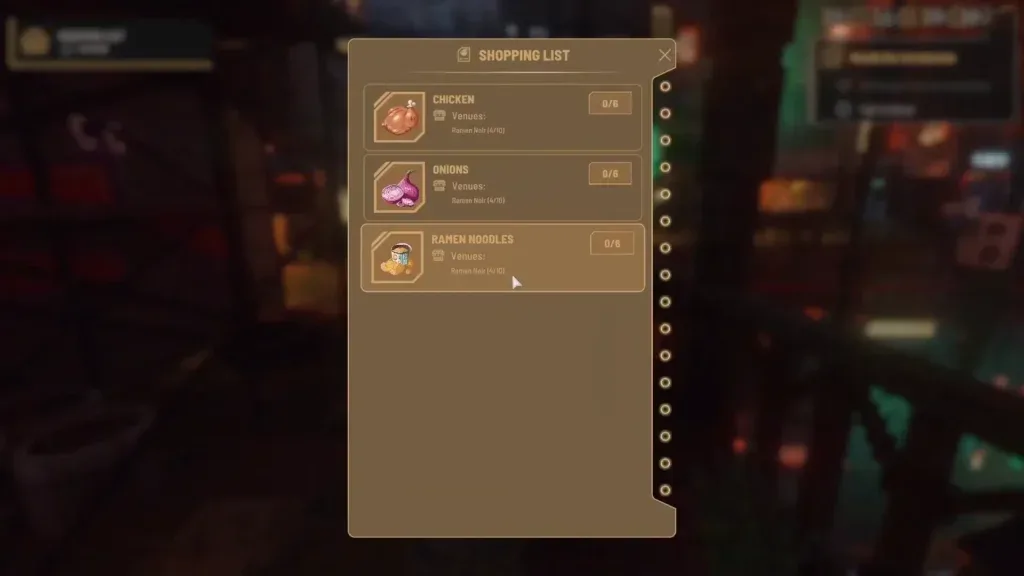
Use the following checks before deciding what happened:
- Compare the venue inventory before and after the Manager’s active shift.
- Check whether the missing ingredient belongs to an active menu recipe.
- Look at the business balance and costs to see whether a purchase occurred.
- Distinguish a shopping-list marker from an empty venue inventory slot.
- Check whether the venue had enough money and storage for the expected purchase.
- Review several ingredients instead of judging the Manager from one shopping-list number.
This distinction does not explain every reported Manager problem. It only prevents two different inventory targets from being mistaken for the same mechanic.
Launch-build ordering limitations
Managers have shown several inconsistent restocking patterns in the launch build. Reports include buying excessive quantities, failing to acquire a needed ingredient, prioritizing items that are already well stocked, and behaving differently between businesses or saves. A higher-level Manager has not been shown to guarantee reliable ordering.
An unofficial technical analysis of the launch build identified one duplicate-ordering problem. According to that analysis, the remaining quantity needed could reset when the Manager moved to another vendor, causing the full amount to be requested again. A same-save, same-hour comparison recorded 37 purchased items under the original behavior and 19 after that specific duplication was removed.
That finding is useful for understanding one failure mode, but it is not developer confirmation and does not explain the entire Manager system. It does not establish why Managers choose a restock time, how the planned serving target is selected, why some orders stop, or why some needed ingredients are skipped. It also does not prove that every large order is a duplicate order.
The developers have acknowledged that Managers are not working well in the launch version and that the system is a current focus. Broader post-launch patches are also in development, but the October 1 snapshot does not contain a confirmed release date for a dedicated Manager fix. Until behavior changes in a documented update, build your operating routine around the limitations that are visible in your own venue.
How to reduce the Manager’s workload
A focused menu reduces the number of ingredients the venue and Manager must coordinate. This is a risk-control measure, not a proven repair for the ordering bugs. It can still make unusual purchases easier to notice and reduce the number of stock lines exposed to unreliable automation.
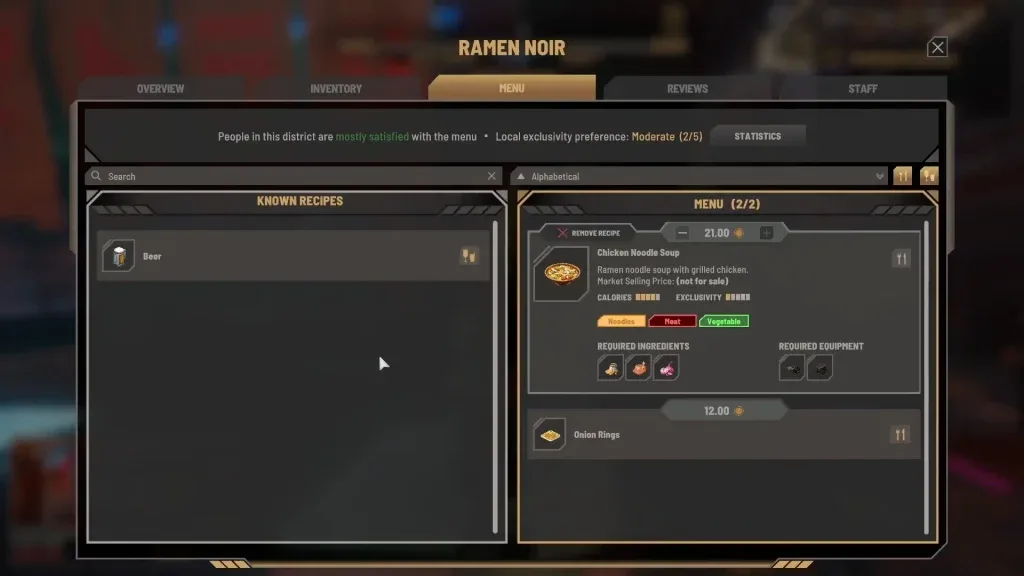
Use this practical setup before leaving a Manager in charge:
- Choose a manageable set of dishes rather than enabling every unlocked recipe automatically.
- Review which ingredients those dishes share.
- Make sure the venue has suitable shelves, cabinets, fridges, or freezers for those ingredients.
- Transfer or acquire any critical stock that the Manager has repeatedly failed to obtain.
- Use greenhouse produce where it supports the active menu.
- Record the venue’s starting cash, key ingredient quantities, and current balance.
- Set a Manager shift that covers the period when you actually want automation.
One player report described a noodle restaurant losing around 1,000 Lims per day while every unlocked recipe was offered. After the menu was reduced to roughly four or five dishes and greenhouse ingredients were used more heavily, the venue became profitable. That is a single reported outcome, not proof that menu size causes the Manager bug or that the same menu count will work for every business. Its useful lesson is narrower: fewer recipes create a smaller and more observable supply chain.
Avoid relying on exact universal inventory targets. There is no verified ideal stock quantity for every ingredient, venue, or Manager. Your goal is to make changes small enough that you can identify which menu, schedule, or stock decision preceded a loss.
A supervised Manager workflow
Manager automation is most useful when you inspect it at consistent checkpoints rather than watching the venue continuously.
Before the shift
Open the venue screen and note the current balance, the day’s costs, and the quantities of ingredients essential to your active recipes. Check worker roles, happiness, and shift coverage. Confirm that storage and refrigeration have free capacity. If a recipe depends on an ingredient that has repeatedly been missed, supply that ingredient manually before leaving.
This creates a baseline. Without one, an unexpectedly low balance cannot be separated from wages, normal ingredient purchases, or an excessive Manager order.
During the shift
Return after the Manager has had time to operate, especially when you are testing a new employee, a longer schedule, or an expanded menu. Compare the inventory with your baseline and look for three signals:
- A needed ingredient remains empty despite available business cash.
- One ingredient increases far beyond the other materials used by the menu.
- Costs rise sharply without a corresponding improvement in service or stock coverage.
Do not use the shopping-list marker as the only test. Inspect the actual venue inventory and the business totals as well.
After the shift
Review gains, costs, and ending balance. Check whether the restaurant served its menu, whether key ingredients ran out, and whether large amounts of perishable stock remain. If the result is poor, change one major variable for the next observation period. You might narrow the menu, shorten the Manager’s active coverage, or manually provide a repeatedly missed ingredient.
Changing several variables at once makes the result difficult to interpret. A simple before-and-after check is more useful than assuming that every bad day has the same cause.
When the venue becomes unstable
If the Manager repeatedly drains the business balance or leaves essential recipes unavailable, stop treating the venue as hands-off. Reduce the scope of automation and supervise its inventory until the behavior changes. Preserve enough cash to keep the business operating instead of letting one unexplained order consume the full balance.
Food spoilage has its own mechanics and deserves separate attention. The Manager problem can worsen the cost by creating excess stock, and the game may use newer stock while older units remain in storage. For this Manager workflow, the relevant action is to watch for accumulating old inventory and avoid assuming that continued recipe use guarantees the oldest units are being consumed.
Manager level and Manager Efficiency
Manager level and Manager Efficiency are related-looking values, but there is no verified formula connecting either value to ordering quality.
Business Level 2 was observed increasing the displayed Manager Efficiency value from 0% to 30%. Business progression is therefore connected to the displayed efficiency statistic. However, there is no official explanation for exactly how that percentage changes purchasing, restock timing, staff support, or profit.
Reports also describe problems with Managers at Levels 1, 3, and 5. A stronger candidate may still be useful as the system develops, but Manager level should not be treated as a confirmed fix for excessive or missing orders. Test the employee’s results in the assigned venue instead of relying on the number alone.
Keep these progression concepts separate:
- Venue level controls the venue’s growth and is the relevant threshold for unlocking Manager hiring.
- Manager level describes the individual worker’s role skill.
- Business Skill belongs to broader player progression and can affect the displayed Manager Efficiency statistic.
- Business permit progression is a separate system and is not established here as a Manager reliability control.
Manager and Advisor roles
A Manager and an Advisor do not perform the same job. The Manager works at an individual venue and participates in its daily operation, including ingredient restocking and staff support. An Advisor becomes relevant later through Business Empire progression and relates to the wider business operation.
Choosing an Advisor therefore does not replace the Manager assigned to a restaurant. Likewise, hiring a Manager does not provide the broader function associated with an Advisor. When reviewing a business problem, first determine whether it concerns one venue’s staffing and inventory or the later empire-level system.
When hiring a Manager is worthwhile
A Manager becomes valuable when the time saved is greater than the extra supervision and financial risk. The role is a reasonable choice when you operate multiple businesses, need to spend substantial time away from one venue, or can supply part of the menu through a greenhouse. Some players report that their businesses continue successfully without constant attention after a Manager is hired.
Delay or limit Manager use when the venue has very little cash, depends on several ingredients that are already difficult to maintain, lacks suitable storage, or cannot absorb an abnormal order. A new venue that still needs frequent menu and equipment changes may be easier to stabilize manually before automation is added.
Use three questions to make the decision:
- Can the venue survive an unexpectedly expensive ingredient order?
- Can you tell from the venue interface whether the Manager improved or damaged the result?
- Does leaving the venue create enough useful time elsewhere to justify continued checks?
If the answer to all three is yes, hire the Manager but inspect the first few shifts. If the first answer is no, build a safer cash and inventory position before relying on automation. If the second answer is no, simplify the menu and establish a baseline. If the third answer is no, manual operation may remain the clearer choice for that venue.
The practical rule for the launch build is simple: a Nivalis Nights Manager can reduce routine venue work, but cannot yet be trusted as unattended control. Give the Manager a focused menu, appropriate storage, a deliberate schedule, and enough operating cash; then verify the result through inventory, costs, and balance after each meaningful change.