
The most reliable place to start is the Hardware and Furniture shop in Meridian Market. Use the Venue Furniture vendor for chairs, benches, tables, storage, and other furnishings. Speak to the separate Hardware vendor when you need equipment, lamps, or items explicitly tagged as decorations. For plants, players report a Home Furniture Retailer in Eastern Residential, beside a butcher.
The important limitation is that no complete, verified citywide furniture-vendor catalog is available for the launch build. The locations below cover the shops and alternatives that can be identified without inventing missing vendors, inventories, schedules, or prices.
Fast Route to the Right Furniture Seller
Use this route when an objective tells you to buy furniture or decorate a venue:
- Travel to Meridian Market.
- Find the shop named Hardware and Furniture.
- Speak to the Venue Furniture seller for ordinary venue furnishings.
- Speak to the Hardware seller in the same shop for appliances, lamps, and some decorative objects.
- Inspect the item name, description, and tags before buying. A style label is not automatically the same as the functional tag required by an objective.
- If the task specifically requires a plant, check the reported Home Furniture Retailer in Eastern Residential, next to a butcher.
- Return to the property, open placement mode, and place the purchased item from the appropriate category.
This distinction between sellers matters because one storefront can contain more than one vendor. Opening the wrong vendor menu can make it look as though the required object is unavailable even when it is sold at the other counter.
Meridian Market Hardware and Furniture
The Hardware and Furniture shop in Meridian Market is the clearest starting point for business furniture. It contains separate vendor interactions for Venue Furniture and Hardware, so decide which type of object you need before browsing.
The Venue Furniture inventory includes examples such as bar chairs, benches, dining chairs, high tables, dish racks, dishwashers, fridges, sinks, kitchen cabinets, cabinet corners, and wall cabinets. These examples should not be treated as a complete inventory list, but they show the role of this vendor: it supplies the objects used to furnish and equip a restaurant or other business venue.
If a tracked business objective asks for a furnishing such as a chair, begin with the Venue Furniture seller. Read the objective carefully before purchasing several similar-looking objects. A bar chair, dining chair, bench, and high table belong to related furnishing groups, but they are not interchangeable merely because each one provides seating or matches the room visually.
The Hardware seller covers a different range. Known examples include blenders, cookers, deep fryers, grills, ranges, air conditioners, ceiling fans, lamps, televisions, watches, and webcams. Some hardware objects may also serve as decorations, but the item's visible classification is more useful than its everyday purpose. A lamp that looks decorative is not automatically proof that it will satisfy an objective requiring the Decoration tag.
No dependable full price table is available. Check the current menu before committing funds, especially early in the game when furniture and decorative hardware may be expensive relative to the money available for running the business.
Choose the Correct Vendor Counter
Inside a furniture shop, the seller category is the first filter to check. Use Venue Furniture for the main physical layout of a business: seating, work surfaces, storage, cabinets, sinks, refrigeration, and similar venue objects. Use Hardware for equipment and smaller functional or decorative devices.
A practical shopping check looks like this:
- If the objective names an exact object, match that object name rather than buying the closest visual substitute.
- If it asks for venue furniture, open the Venue Furniture inventory first.
- If it asks for hardware or equipment, check the Hardware inventory.
- If it asks for a decoration or plant, inspect the tags shown on individual items.
- If the item carries only a design style such as Art Deco, do not assume that wording equals the separate Decoration classification.
- If a table lamp or another visually decorative object does not advance the objective, return to the item details and look for the explicit required tag.
This method is more dependable than judging objects by appearance. The shop menus mix practical equipment, room furnishings, style labels, and objects that can contribute to decoration requirements. The objective normally cares about the recognized object or classification, not whether the player considers the item decorative.
Eastern Residential Plant and Home Furniture Retailer
For plants, players report a Home Furniture Retailer in Eastern Residential. The useful landmark is a butcher located beside the shop. This is the best available directional description, but an exact map pin, shop schedule, and complete stock list are not confirmed.
Use this location when an objective explicitly asks for plants or when Meridian Market does not show an appropriate plant in the vendor menu you opened. Once in Eastern Residential, inspect nearby storefronts for the home-furniture seller and use the butcher as the distinguishing neighbor.
Because this location is based on player reports rather than a verified full vendor directory, approach it as a targeted check rather than proof that it is the city's only plant seller. Nivalis contains multiple districts and reportedly has additional furniture shops, but their names, positions, and inventories are not established well enough to present as a complete list.
Other Reported Furniture and Hardware Options
Players also report a Hardware vendor at Sonic Flow in The Docks. This can serve as a secondary place to check for hardware and decoration-tagged objects if Meridian Market is inconvenient or does not provide the item you need.
The available information does not establish whether the Meridian Market and Sonic Flow vendors always carry identical inventories. Do not plan a purchase around an assumed shared catalog, price, or schedule. Open the vendor menu and verify the actual object and tags shown in the current game session.
There are reports of many furniture shops across the city, but a reliable launch-build directory is not yet available. Listing unnamed stores as confirmed destinations would be less useful than directing players to the known shop in Meridian Market, the reported plant retailer in Eastern Residential, and the reported hardware option at Sonic Flow.
Find Items That Count as Decor
Decoration objectives can be confusing because several kinds of text may appear around an item. The object can have a name, a description, a visual style, and a functional classification. The safest approach is to find the explicit classification requested by the objective.
For a task requiring decor:
- Open the Venue Furniture or Hardware menu at the Meridian Market shop.
- Highlight individual objects rather than relying on the storefront or category name.
- Read the labels attached to each object.
- Look specifically for Decoration when the task asks for a decoration.
- Look for Plant when it asks for a plant.
- Treat labels such as Industrial, Contemporary, or Art Deco as style information unless the objective explicitly requests that style.
- Buy only after the required tag or exact object has been identified.
- Place the object in the property and then check whether the objective updates.
A clock sold through a hardware vendor has been reported as one option carrying the Decoration tag. That makes the Hardware counter worth checking even when the objective sounds like a furniture-shopping task. However, the clock's current price and universal availability are not established, so verify its menu entry rather than assuming it will always be the cheapest solution.
Table lamps have caused confusion because an item can look like decor without satisfying the relevant requirement. If a lamp does not count, the useful next step is not to buy more copies. Reopen the menu, inspect the tags, and choose an item explicitly classified for the objective.
Free Decor and Plant Alternatives
Before spending money, check the objects already present in the apartment. Players report that the apartment's plant and picture of the dog can be picked up and reused elsewhere. The plant has also been reported to count as both a plant and a decoration, making it a potentially useful no-purchase option for an early decorating task.
This alternative is especially valuable when decorative hardware is too expensive. It also demonstrates that an objective may care about the placed object's classification rather than whether it was newly purchased.
Use the apartment alternative carefully:
- Confirm that the object can be selected and stored through placement mode.
- Make sure it appears in the placement inventory before leaving.
- Place it at the property named by the objective rather than assuming possession alone will count.
- Check the objective after placement.
- If moving an apartment object does not register, use an explicitly tagged vendor item instead.
The available information does not confirm that every apartment decoration can be transferred or that every visually similar plant carries the same classifications. Limit this shortcut to objects the interface actually allows you to store and place.
Place Purchased Furniture
Buying an object is only the first half of the task. Purchased or stored furniture must be placed inside the appropriate apartment or venue through placement mode. On the launch-build PC layout, placement mode is opened with P when the default binding is unchanged. If that key does not work, check the current control bindings rather than assuming the feature is unavailable.
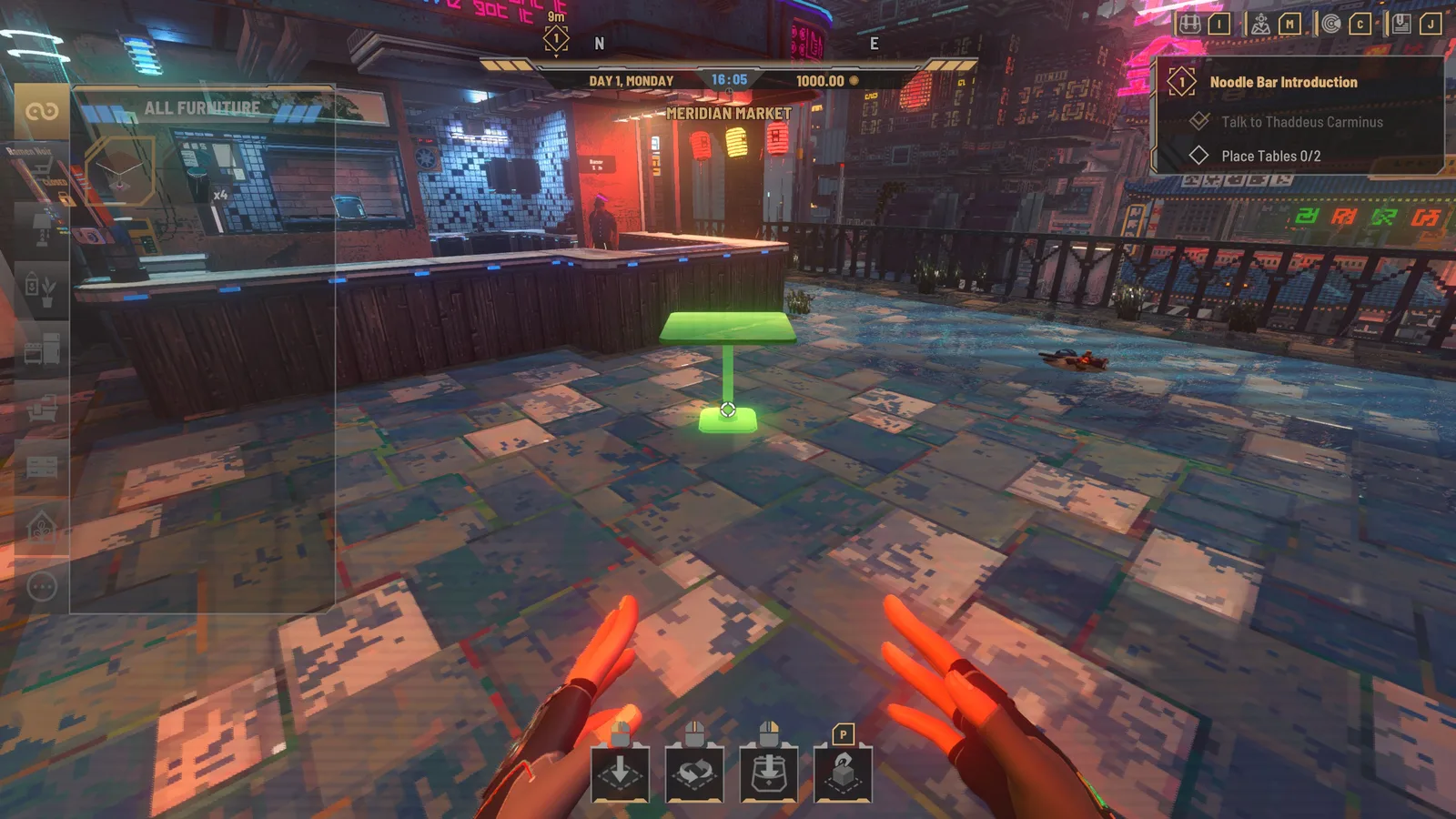
A reliable placement workflow is:
- Enter the apartment or business where the item is needed.
- Open placement mode.
- Select All or the relevant category, such as furniture, lights, decorations, or appliances.
- Find the purchased or stored object in the available-item list.
- Select it and move the preview to a valid position.
- Rotate the object until it fits the intended layout.
- Confirm placement.
- Leave placement mode and check the tracked objective or venue state.
If the object is missing, first check whether the wrong category is selected. An appliance may not appear under Decorations, and a venue furnishing may be separated from hardware or lighting. Switching to All is a useful diagnostic step because it removes category filtering from the search.
Also verify that the purchase was completed and that you are editing the correct property. A restaurant objective may require placement in that venue rather than in the apartment. Similarly, putting a plant in storage or carrying it to another district is not necessarily the same as placing it inside the target property.
Common Furniture Vendor Problems
The shop does not show the required item
Confirm which seller menu is open. The Hardware and Furniture shop separates Venue Furniture from Hardware. Exit the current menu and speak to the other seller before traveling across the city. If the task requires a plant, use the Eastern Residential retailer as the next reported location.
A decorative-looking object does not count
Inspect its explicit tags. Art Deco describes a style and should not be treated as proof of the Decoration classification. The same caution applies to lamps, pictures, and other objects that look decorative but may be categorized differently by the game.
The objective mentions a local trader but there is no decoration sign
The useful label may appear in the individual item's information rather than on a separate shop sign. Highlight the merchandise and inspect its classifications for Decoration, Plant, or the exact term named by the objective.
The purchased item is absent from placement mode
Switch the placement list to All, then check the furniture, light, decoration, and appliance categories. Confirm that the transaction finished and that placement mode is open inside the intended property.
The furniture is too expensive
Check whether a transferable apartment object can satisfy the task. The apartment plant and dog picture are reported reusable options, and the plant may cover both plant and decoration requirements. Verify that the object can be stored, placed, and recognized before buying a substitute.
The known vendor location is not enough
Use the district and nearby landmark rather than relying on an unverified map coordinate. Meridian Market has the named Hardware and Furniture shop. The Eastern Residential plant retailer is reported beside a butcher. Sonic Flow in The Docks is a reported secondary hardware destination. Exact schedules, inventories, and a complete citywide vendor map remain practical limitations of the current launch-build information.