
If your Nivalis Nights Manager is buying too much food, first compare the venue's actual inventory and spending with its active menu. The launch build has acknowledged Manager problems, including excessive purchases, missed ingredients, and orders for stock already held. Reduce the menu's ingredient workload, manually supply critical shortages, and limit reliance on automated purchasing while you check the result.
There is no confirmed universal Manager fix in the October 1, 2026 snapshot. The unofficial Manager Order Fix mod targets duplicate orders across vendors, but its author explicitly says that it does not repair every Manager problem. A shopping-list reminder can also remain after a legitimate order because the list and Manager use different stocking targets.
Identify the kind of stock problem
A large purchase is worth investigating, but inventory quantity alone does not establish the cause. Compare what the restaurant needed, what it received, and what happened to its balance.
| Symptom | What it may represent | First check |
|---|---|---|
| One ingredient rises far beyond the apparent shortage | Duplicate ordering or a larger Manager target | Compare before-and-after inventory and current recipe needs |
| Cash disappears while the needed ingredient remains missing | Wrong-item purchasing, budget limits, or another ordering failure | Check every active recipe's essential stock and venue costs |
| Shopping List still says an ingredient is required | Different shopping-list and Manager targets | Inspect actual inventory before calling it a failed delivery |
| Older food spoils while the ingredient is still being used | Excess stock or freshness-selection behavior | Check individual stack condition, not only total quantity |
| Purchases increase after enabling many recipes | A larger supply workload, possibly combined with ordering bugs | Compare the newly added ingredients and menu demand |
Player reports include both successful automation and serious failures. Some players can leave a managed venue running, while others see unnecessary purchases or no useful restocking. Do not assume that all saves have the same failure or that a working Manager elsewhere proves your venue is configured incorrectly.
The useful first distinction is between an expensive but relevant order, duplicated quantities, and an order for the wrong ingredient. Each produces a different inventory pattern and calls for a different comparison.
Record a baseline before another Manager shift
Preserve a manual save, then inspect the affected venue before changing its menu or staff schedule. A baseline makes the next purchase understandable.
Record the following:
- The dishes currently enabled on the menu.
- The ingredient types required by those dishes.
- The quantities and freshness of important ingredients in venue storage.
- The venue's available cash, current costs, and balance.
- The Manager's scheduled coverage.
- Whether greenhouse produce or a manual delivery is about to add stock.
Then inspect the same information after a comparable operating period. If you deliver chicken yourself between the two checks, record that delivery rather than attributing every inventory change to the Manager.
Use the recipe interface to confirm relevance. A large quantity of food is not helpful if the venue lacks the particular ingredient required by its active dish. Conversely, an ingredient shared by several active recipes can have a legitimate reason to be stocked in larger quantities than a rarely used item.
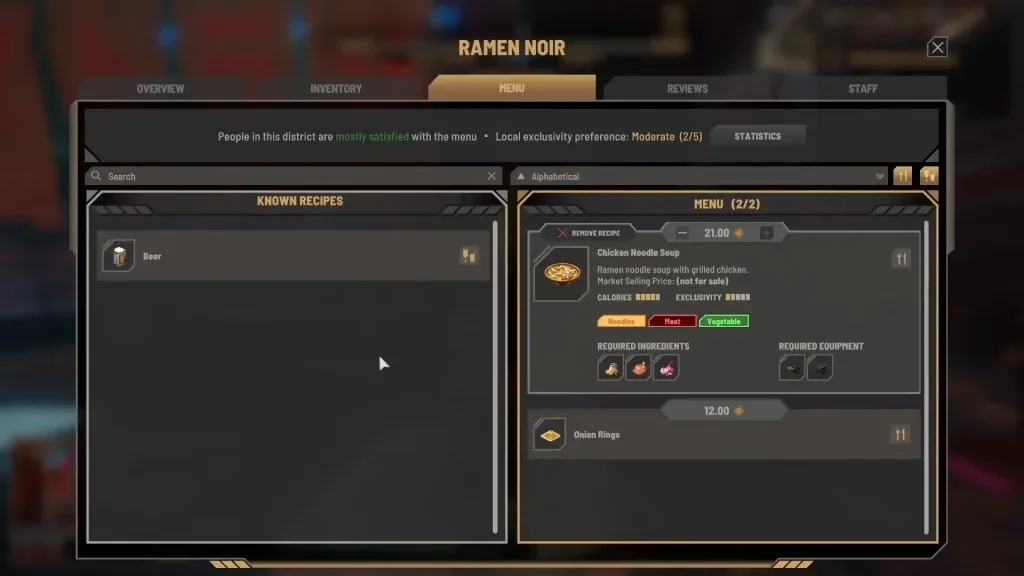
Avoid changing staffing, menu, storage, and supply method simultaneously during the first comparison. If the venue improves after four changes at once, you cannot identify which change reduced the loss. Start with the variable that most clearly matches the visible problem.
Shopping-list quantities are not Manager order quantities
The unofficial mod author's launch-build analysis describes two separate systems. The Shopping List flags an active-menu ingredient when its quantity is below ten. A Manager calculates its own order from ingredient use per serving, the number of servings it plans to stock, and a ten-percent buffer.
The author had not resolved how the planned serving count is selected. These details are an unofficial technical explanation, rather than a developer specification of the complete system.
A simple example demonstrates the difference. If chicken increases from one to six, the Shopping List can still show four required to reach its threshold. That does not automatically mean the Manager lost the delivery or did nothing. It means the Manager's computed target did not match the list's threshold.
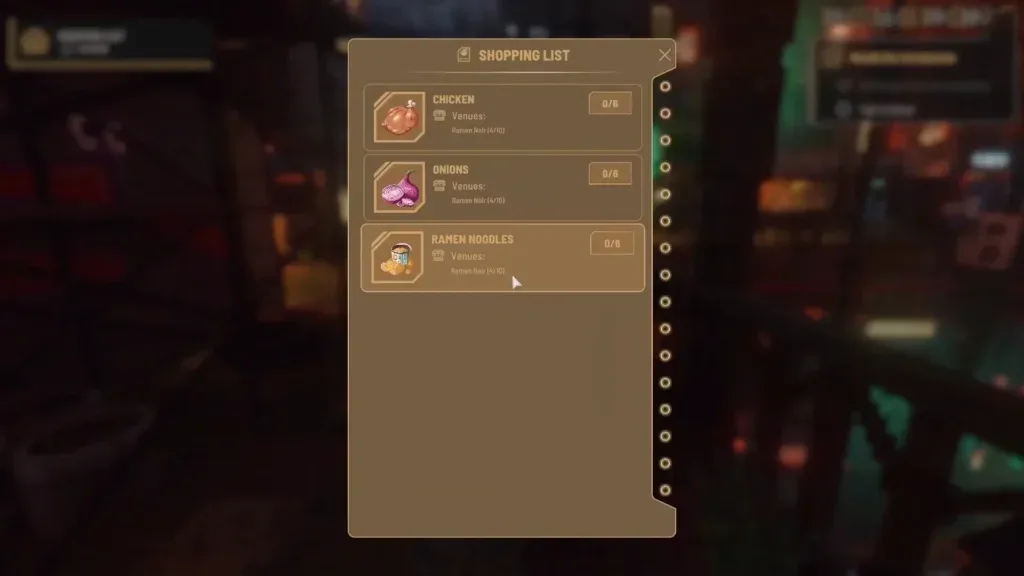
Use the displayed list as a remaining-shortage check. Do not subtract the same existing inventory from that displayed shortage again. When diagnosing a Manager, compare the actual stock before and after its work rather than expecting it to clear every reminder.
Ten is also not a verified ideal stock level for every recipe or restaurant. It is the threshold described for the list in that launch-build analysis. Treating it as a universal profit-maximizing inventory target would confuse a reminder mechanism with an operating strategy.
The duplicate-vendor ordering problem
Manager Order Fix addresses a specific failure identified by its author: the running amount still needed resets when the ordering loop reaches another vendor. More than one vendor can therefore be asked for the full original amount before a later check stops the order.
For example, a five-potato need can become five potatoes from one vendor and five more from another. This is different from a Manager deliberately calculating a ten-potato target. The duplicated order repeats the original requirement instead of reducing the remaining need after the first purchase.
The mod author reported a same-save, same-hour comparison in which the original behavior bought 37 items and the corrected behavior bought 19. Those counts illustrate one test. They are not a guaranteed percentage reduction for every venue, menu, or save.
The author also notes that vendor prices can change when the save is loaded. When comparing behavior, record quantities as well as total cost. A cheaper or more expensive reload can obscure whether the quantity problem changed.
This explanation leaves several questions unresolved: when Managers choose to restock, how planned servings are selected, why some needed ingredients are skipped, and why some saves appear to stop ordering or selling. Removing duplicate orders cannot by itself answer those questions.
Reduce the workload without promising a bug fix
A focused menu exposes fewer ingredient lines to unreliable automation and makes abnormal purchases easier to notice. It is an operating safeguard, rather than proof that a large menu causes the underlying bug.
- Inspect the active recipes at the affected venue.
- Identify ingredients introduced by dishes you recently enabled.
- Temporarily use a smaller set of dishes that you can supply and observe.
- Confirm that their required equipment and storage are available.
- Supply any repeatedly missed essential ingredient manually.
- Recheck the venue's cash and stock after the next Manager-covered period.
One player reported recovering a noodle restaurant that had been losing around 1,000 Lims per day after reducing its menu to about four or five dishes and using more greenhouse produce. That is a single reported outcome. It does not establish the same menu count as optimal for every business, or show that greenhouse production repairs the ordering logic.
Use the report as a reason to simplify an overloaded operation, not as a formula for guaranteed profit. If the Manager still buys irrelevant stock after the menu is narrowed, preserve that result as evidence that simplification did not resolve the failure in your save.
Protect the ingredients that keep service running
An excess of one ingredient can coexist with a shortage of another. Prioritize the items whose absence prevents the current menu from being served.
Check those ingredient types before leaving the district. If the Manager repeatedly misses one, buy or produce it yourself and transfer it into venue storage. Fishing and greenhouse produce can supplement supplies where they match the restaurant's actual recipe needs, but they do not replace every vendor purchase.
Maintain appropriate storage for perishable food. Cabinets and shelves expand ordinary capacity, while fridges and freezers matter for ingredients that display cold-storage requirements. Overbuying can become more expensive when stock cannot be kept in the indicated storage conditions.
Inspect older stacks as well as total quantity. The launch build can use newer ingredients while older ones remain until they spoil. Continued service therefore does not prove that the most vulnerable stock is being consumed first.
If automated purchases repeatedly exhaust the venue's balance, shorten or otherwise limit the Manager's active coverage through the staff schedule and supervise supplies yourself while comparing results. There is no verified universal schedule that eliminates the bug. In particular, advice to avoid the first hour of the day remains anecdotal and should not be presented as a confirmed repair.
Higher levels do not guarantee correct ordering
Manager level, player Business Skill, and venue level describe different systems. A venue reaching Level 3 unlocks Manager hiring; that threshold does not establish that its ingredient automation is reliable.
Business Level 2 has been observed increasing the displayed Manager Efficiency statistic from zero to thirty percent. The exact effect of that percentage on purchasing decisions has not been officially explained. Raising it should not be treated as a confirmed solution to duplicate orders or missed stock.
Reports describe problems with Managers at different individual levels. One player with a Level 5 Manager reported an order for 30 additional kahlua while chicken needed for the newly enabled dish remained unpurchased. The report is useful because it shows why a high skill number alone is insufficient evidence of correct ordering.
Judge the employee by its inventory and spending results at the assigned venue. Replacing a Manager can be an experiment, but it should not be described as a guaranteed fix when the same types of problems have appeared with stronger candidates.
Evaluate Manager Order Fix for its stated scope
If you choose to use the unofficial mod, back up your saves and check its current game-build and loader instructions before installing it. The available material does not establish a complete installation path for this particular download, so do not copy a directory from another plugin and assume it applies.
The mod's default Vanilla setting retains the game's vendor order. Optional Cheapest, Local, and Balanced settings alter which vendor is considered first. They do not change how many units the Manager decides it needs.
The author's explanation describes the original vendor order as favoring higher stock rather than comparing price or distance. That is separate from the duplicate-order correction. If you enable a custom priority, note the choice so that you know which behavior changed during a comparison.
A successful duplicate-order correction may leave fewer ingredients in inventory than the unmodified game. That can look worse against the Shopping List's threshold even when repeated purchases have been removed. Compare against the intended order and actual service, rather than equating larger stock with a better result.
Stop treating the mod as successful if your needed supplies still disappear, purchases do not reach the venue, or the business stops operating normally. Preserve the clean backup and relevant details. Community reports of both improvement and continuing problems mean that the mod cannot be described as a complete Manager repair.
Escalate a repeatable problem with useful details
The developers have acknowledged Manager problems and are working on them. As of October 1, 2026, no dedicated fix date had been announced. An expectation that the next patch will repair everything remains speculation until the actual update describes or demonstrates the change.
For a support report, include the affected venue, active menu, Manager level and schedule, available cash, before-and-after ingredient quantities, and the steps leading to the unwanted purchase. Note any mods and whether the problem also occurs without them. Screenshots of the relevant recipe, inventory, and costs are more useful than a report that only says the Manager wastes money.
Keep the manual save that precedes the failure when possible. That preserves a clear comparison point while you continue with a smaller menu, manual critical supplies, and closer supervision of the venue's balance.