
Food spoiling in Nivalis Nights is best controlled by buying smaller amounts, checking each stack's remaining freshness, and transferring ingredients into suitable venue storage as soon as possible. Some ingredients require refrigeration or freezing, while ordinary shelves and cabinets are sufficient for others. The launch build may also use newer stock before older stock, so a restaurant can keep cooking while an aging stack remains untouched and eventually spoils.
There is no supported universal spoil-time table for every ingredient in the launch build. Treat the decay information shown on the item itself as the reliable decision point. Before every shopping trip, compare the venue inventory, the active menu, and the shopping list instead of assuming that every listed ingredient needs another full stack.
Use this short routine whenever spoilage becomes expensive:
- Check the venue inventory before buying anything.
- Identify stacks with the least time remaining.
- Confirm which ingredients the current menu actually requires.
- Buy only enough to cover the immediate shortage.
- Transfer purchases from your inventory to the venue.
- Put ingredients in the storage type indicated by their item information.
- Recheck older stacks before making the next purchase.
- Hand spoiled items to a vendor or retain them for later composting.
Read Freshness Before You Buy
Vendor and inventory screens can show the condition of individual ingredient stacks. Some ingredient stacks can be marked as decaying in less than two days. Different stacks of the same ingredient can therefore present different freshness states, so the ingredient name alone is not enough information for a safe purchase.
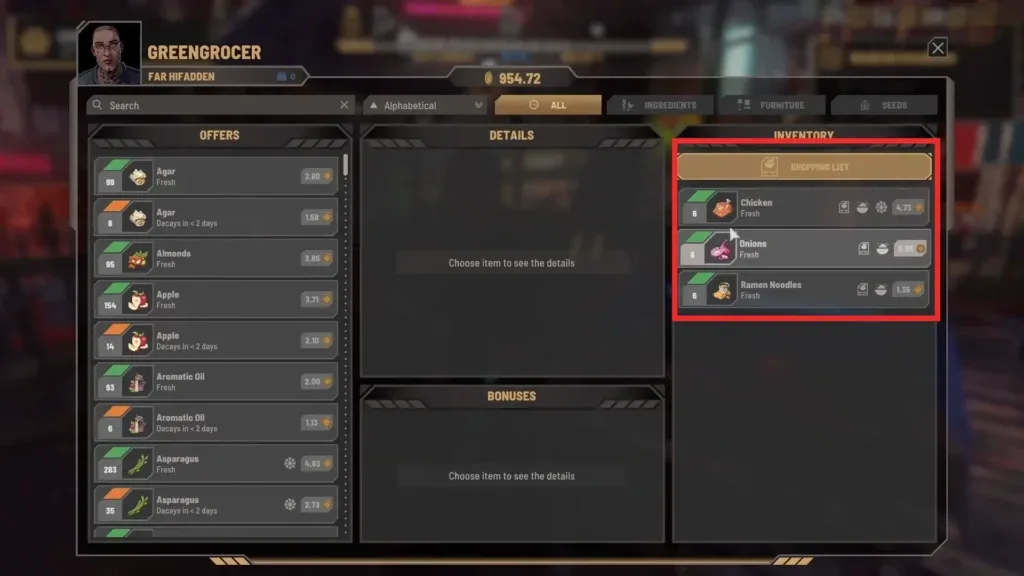
Inspect these details before confirming a trade:
- Remaining freshness: Prefer stock that will survive the period in which you expect to use it. An aging stack may still be useful when the venue needs it immediately, but it is a poor choice for speculative storage.
- Existing quantity: Check both the stock already held by the venue and the ingredients still carried in your personal inventory.
- Storage requirement: The item information can indicate that an ingredient should be kept in a fridge or freezer. Plan where it will go before purchasing it.
- Menu demand: An ingredient has no near-term value if none of the dishes currently offered can use it.
- Shopping-list shortage: Use the shopping list as a prompt to investigate a shortage, not as permission to ignore freshness or buy an excessive reserve.
A lower price does not automatically make an aging stack economical. If the restaurant cannot consume it before it spoils, the effective cost includes both the purchase and the storage space it occupies. Conversely, short-dated stock can be reasonable when the venue is already missing that ingredient and will use it promptly. The correct choice depends on current demand, not a fixed rule that fresh or aging stock is always better.
Do not rely on a remembered purchase date. Two visually identical stacks may have different decay states, and chilled storage can change how quickly an item deteriorates. Read the current item display each time you review inventory.
Match Stock to the Menu and Shopping List
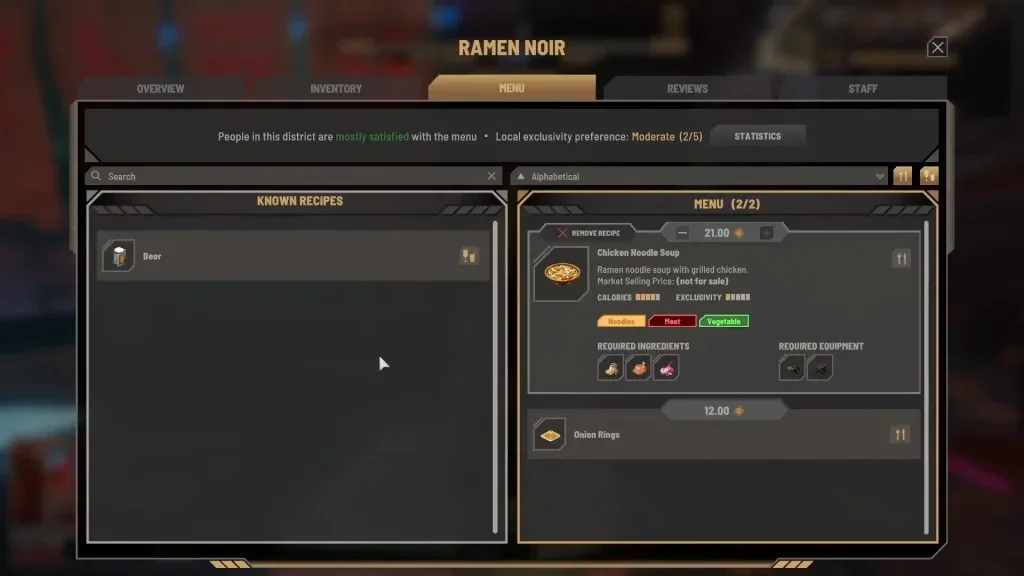
The safest purchasing target is the overlap between three things: dishes currently on the menu, their required ingredients, and the shortage shown by the venue's shopping list. If an ingredient appears in only one of those places, pause before buying it.
The recipe display identifies the ingredients and equipment associated with a dish. Use that information to confirm that a planned purchase has an active purpose at the restaurant. Do not unlock or add extra dishes merely to rescue surplus stock; expanding the menu can introduce still more ingredients that need to be purchased and monitored.
The shopping list provides a more immediate view of what the venue says it needs. In the available interface example, it lists required ingredients and quantities together, making it a better starting point than guessing from memory.
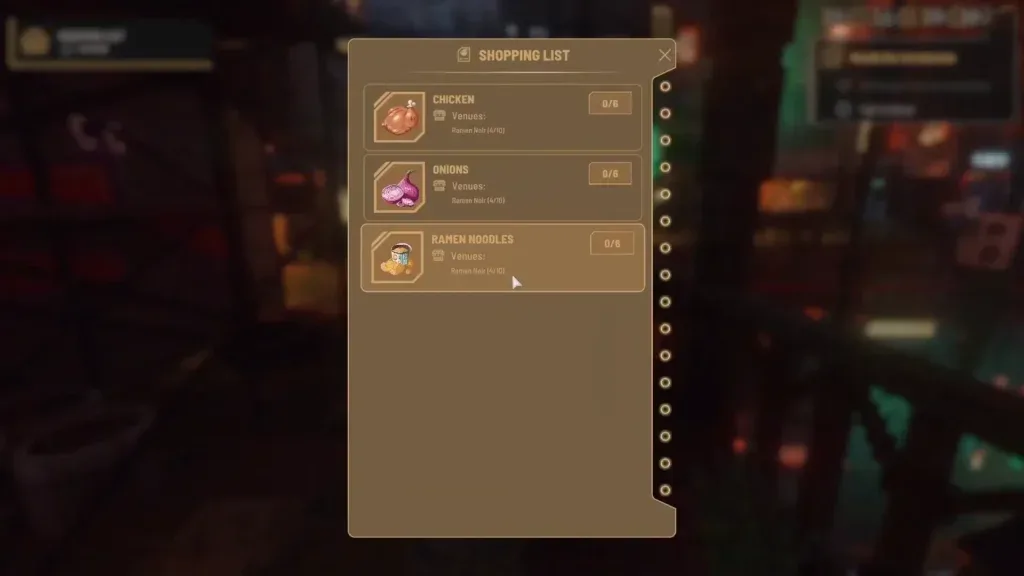
Follow this comparison before leaving a vendor:
- Open the venue inventory and note how many usable stacks already exist.
- Check which of those stacks are closest to spoiling.
- Review the dishes actually offered by that venue.
- Open the shopping list and identify genuine shortages.
- Read the displayed remaining shortage after checking the venue stock; do not subtract existing stock from that shortage a second time.
- Buy the smallest practical amount that closes the immediate gap.
- Return the ingredients to the correct venue and transfer them into storage.
Exact consumption rates for every recipe and a complete ingredient-duration database have not been verified. Avoid building a large reserve around an assumed number of dishes per day. Observe what the venue uses, then adjust the next purchase. A small shortage is easier to correct than a fridge full of expiring ingredients.
If several dishes require unrelated ingredients, inventory becomes harder to rotate. A focused menu reduces the number of separate stacks competing for storage and attention. This does not prove that a large menu directly causes spoilage, but it gives you fewer perishable items to inspect and fewer opportunities to buy something the venue will barely use.
Store Ingredients in the Correct Container
Ingredients must be transferred into venue storage for restaurant use. Restaurants provide some storage space, and that capacity can be expanded with cabinets, shelves, fridges, and freezers. These container types are not interchangeable for every ingredient: some food specifically requires refrigeration, and the item information may identify a preferred fridge or freezer.
Use the following storage workflow after shopping:
- Return to the restaurant that needs the ingredients.
- Open an appropriate storage container at the venue.
- Review the purchased stacks in your personal inventory.
- Transfer the ingredients into the container.
- Reopen the venue inventory and confirm that the transfer succeeded.
- Check that chilled or frozen items did not end up in ordinary storage.
Do not assume that buying a fridge solves spoilage by itself. Chilled storage slows deterioration, but it does not remove the need to control quantities or monitor freshness. A refrigerator full of excess stock can still produce waste, especially if the restaurant keeps selecting a newer stack while an older one remains unused.
Storage capacity should also follow the menu rather than lead it. Adding more cabinets or chilled containers gives you room, but empty space is not a reason to fill them. Expand storage when the venue has a demonstrated capacity problem or needs the correct container type for active ingredients.
When reviewing several containers, look for duplicate stacks. Food can appear adequately stocked in one place while an older stack is overlooked elsewhere. The important figure is the venue's total usable supply and the condition of each stack, not the contents of the first container you open.
Rotate Stock Without Assuming Oldest First
Players have reported a launch-build stock-order problem: cooks can draw from newer ingredients while older ingredients remain in storage. That behavior explains why a frequently used ingredient may still spoil. The restaurant is consuming the correct ingredient type, but it may not be consuming the stack with the shortest life remaining.
Because a built-in priority control has not been verified, do not assume that staff will automatically follow first-in, first-out rotation. Instead, audit aging stacks manually:
- Inspect duplicate stacks of the same ingredient.
- Note which stack has the shortest remaining freshness.
- Avoid purchasing another stack while usable older stock remains.
- Keep the active menu focused enough that you can recognize slow-moving ingredients.
- Check inventory again after the venue has operated and see whether the aging stack changed.
- If the older stack remains untouched, stop adding more of that ingredient until the surplus falls.
This is especially important when chilled and unchilled stacks coexist. Time remaining matters more than purchase order because storage conditions can cause two stacks to age at different rates. The oldest purchase is not necessarily the stack closest to spoiling.
An unofficial launch-build modification exists that changes ingredient selection to use the stack with the least time remaining first. Its author reports that it covers cooks, storage, and transfers, but this is not a built-in game feature or developer-confirmed fix. Mod installation and compatibility belong to a separate modding guide. For an unmodified game, manual purchasing discipline remains the lowest-risk response.
Control Surplus Created by Restaurant Automation
Food spoilage can become more severe when a Manager purchases excessive or inappropriate stock. Launch-period reports include Managers buying large quantities, failing to obtain a needed ingredient, or continuing to buy something already well stocked. Higher Manager level is not established as a guarantee of reliable restocking, and the exact effect of the displayed Manager Efficiency percentage has not been officially defined.
Keep this issue separate from ordinary storage mistakes. If ingredients are correctly stored but unexplained surpluses keep appearing, review the venue's purchasing behavior:
- Record the important ingredient quantities before the Manager operates.
- Check the venue's available cash.
- Review the same inventory after the next automated purchasing period.
- Identify ingredients that increased despite already having usable stock.
- Reduce menu complexity if too many unrelated ingredients are being managed.
- Continue checking critical supplies yourself instead of treating automation as fully hands-off.
A smaller menu can limit the number of ingredients exposed to unreliable purchasing, but it is a damage-control measure rather than a confirmed repair. The Manager system was acknowledged as a launch-build problem, and no dedicated correction date had been announced as of October 1, 2026.
What to Do With Spoiled Food
Once an ingredient has spoiled, the supported disposal paths are simple. Vendors will accept spoiled food, although player reports disagree about whether the return is nothing or merely a very small amount. Do not plan around recovering a specific sum. Use the vendor transaction primarily to remove unusable stock from your inventory.
Spoiled food can also be saved for composting later in the game. This gives it a future use if you have enough space and are progressing toward that system. The compost unlock conditions, processing quantities, and resulting values have not been verified, so avoid stockpiling unlimited spoiled food on the assumption that it will become highly profitable.
Choose between the two confirmed options according to your immediate constraint:
- Give it to a vendor when you need to clear inventory or storage now.
- Keep it for composting when you have room and expect to use that later-game system.
Placing spoiled food in another business's storage has been mentioned by players, but access to competitor storage is inconsistent in player reports. It is not a dependable disposal method and should not be part of a routine stock plan.
Troubleshoot Repeated Food Spoilage
Use the visible symptom to determine which part of the routine is failing.
| Symptom | Check first | Practical response |
|---|---|---|
| Newly bought food expires quickly | Freshness shown at the vendor | Inspect each stack and avoid short-dated stock unless it will be used immediately. |
| Refrigerated ingredients still spoil | Quantity and remaining time | Refrigeration slows decay; it does not make excess stock permanent. Buy less and recheck aging stacks. |
| A common ingredient spoils while dishes are being sold | Duplicate stacks of that ingredient | The launch build may consume newer stock first. Stop adding more and monitor the oldest usable stack. |
| The shopping list keeps producing surplus | Venue inventory and current menu | Confirm the shortage against stock already held before buying the displayed amount. |
| Many unrelated ingredients expire together | Number of active dishes | Focus the menu so fewer perishable ingredient types need simultaneous rotation. |
| Stock rises without manual shopping | Manager purchasing behavior | Compare quantities before and after automation and keep supervising key ingredients. |
| Spoiled food occupies needed space | Vendor access and compost plans | Hand it to a vendor for removal or retain only a manageable amount for later composting. |
If the cause remains unclear, make a manual save from the Pause Menu before conducting a short inventory test. Note the quantity and freshness of one problem ingredient, let the venue operate, and inspect it again. This will not reveal every hidden rule, but it can show whether the restaurant is consuming the older or newer stack without risking much progress.
The dependable launch-build strategy is therefore conservative: read the freshness display, buy against a verified shortage, use the indicated storage, and inspect duplicate stacks rather than trusting automatic rotation. That routine cannot stop time-based decay, but it prevents the most avoidable causes of wasted food and makes genuine Manager or stock-order problems easier to recognize.