
The Nivalis Nights Business Skill is a separate character progression track tied to business management. In the launch build, its clearest visible effect is a higher Manager Efficiency stat: Business Level 2 can raise the displayed value from 0% to 30%. What that percentage changes behind the scenes is not explained precisely, so do not read it as a guaranteed restocking, profit, or staff-performance bonus.
That limitation matters because several systems use levels. Your Business Skill level is not your venue level, an employee's Manager level, or a business permit tier. Check the label attached to any unlock or percentage before deciding what to upgrade.
Confirmed effects and current limits
| Topic | What you can rely on | What remains unclear |
|---|---|---|
| Business Skill | It appears as its own skill alongside Trading, Boat, Farming, Cooking, Fishing, and Serving | The complete XP formula and a normal level-by-level unlock table are not available |
| Manager Efficiency | Business Level 2 can change the displayed stat from 0% to 30% | The exact calculation and the actions improved by each percentage point are not explained |
| Manager access | A venue can hire a Manager once that venue reaches Level 3 | Raising Business Skill is not shown as the requirement for this unlock |
| Manager reliability | Managers are intended to automate parts of venue operation | A higher efficiency display does not currently prove error-free purchasing or stocking |
| Overnight level jump | Some launch-version saves can jump from Business Level 1 to Level 5 after sleeping | This is an acknowledged issue, not a valid shortcut or a trustworthy picture of normal progression |
The useful approach is therefore simple: read Business Skill as a progression track with a visible Manager Efficiency connection, but judge the result through the venue's actual finances and inventory. Avoid building a strategy around an undocumented formula.
How to read the Business Skill screen
Open the in-game menu and go to the skills area. The menu groups Business with the other character skills, so make sure Business is the selected category before recording a level or bonus.
Use this check in a consistent order:
- Note the current Business level.
- Record the displayed Manager Efficiency percentage, if one is shown.
- Return to the venue interface and note the venue's own level separately.
- Open the staff area and identify which employee is assigned the Manager role.
- Compare the venue's cash, costs, balance, and important ingredient stocks before and after a normal operating period.
- Recheck the Business screen after an end-of-day transition, especially if the level changed unexpectedly.
This order prevents three common mistakes. First, a venue upgrade can change venue capacity without proving that Business Skill increased. Second, a staff member can improve an individual work skill without changing your character's Business level. Third, the launch bug can create a dramatic overnight jump that looks like normal progress even though it is not.
There is no dependable, complete list of actions and XP values for quickly farming Business Skill in the current snapshot. Continue normal business progression, watch the skill interface, and treat any claimed one-action leveling method cautiously unless the game itself displays the change. Repeating an activity merely because it seems business-related could waste an in-game day without proving what awarded the progress.
Keep Business Skill separate from venue progression
Venue level governs the individual location. It can affect how that restaurant develops, including how many staff members it can support. A Manager becomes available when the venue reaches Level 3. That is a venue requirement, not a confirmed Business Skill requirement.
The distinction is easier to remember when each level has one owner:
- Business Skill level belongs to the player's Business progression and is connected to the displayed Manager Efficiency stat.
- Venue level belongs to one restaurant or other business location. It controls that venue's growth and staffing context.
- Manager level belongs to the employee acting as Manager. A higher-level Manager should not be treated as a guarantee that restocking will behave correctly in the launch build.
- Business permit tier is a separate unlock system. Do not assume a Business Skill level automatically grants a permit unless the game presents that requirement directly.
- Trading Skill is another separate character skill. A Trading level or vendor-tier change is not Business Skill progress.
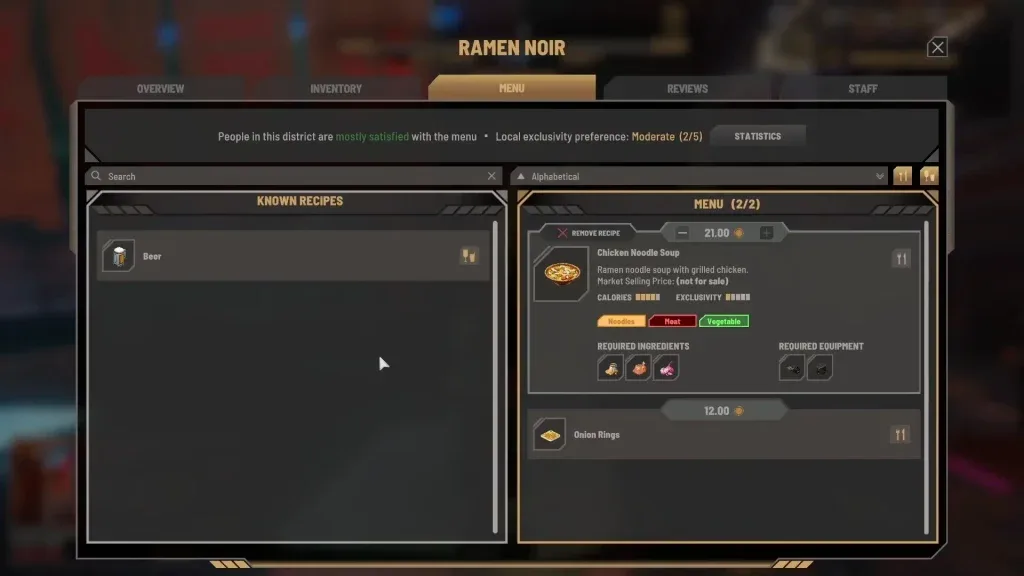
The venue interface includes operational information such as current, weekly, monthly, and lifetime finances; staff assignments; menu capacity; tables; cleanliness; rating; and reviews. Those fields describe the location. They are useful for evaluating whether a Business Skill change helped, but they do not replace the Business tab's own level readout.
A concrete example of this separation is a venue reaching its next venue level and gaining more menu capacity. That is evidence of venue progression. It does not establish that Business Skill rose at the same time, even if both events happened during the same day.
What Manager Efficiency can safely tell you
Manager Efficiency is the strongest visible link to Business Skill, but the number needs a narrow interpretation. Business Level 2 can display a move from 0% to 30%. The safe conclusion is that Business progression changes the Manager Efficiency stat. The unsafe conclusion is that a 30% value makes every Manager order 30% cheaper, 30% faster, or 30% more accurate. None of those formulas is established.
Managers are intended to reduce micromanagement. Their role can include restocking ingredients, supporting staff efficiency and morale, and using produce from a greenhouse. That makes the Business Skill connection potentially valuable when you operate more than one location. However, launch-build Manager behavior can vary between venues and saves. Reported problems include buying excessive quantities, ignoring a needed ingredient, and prioritizing stock that is already plentiful.
Because the exact Efficiency effect is unclear, use it as a comparison point rather than a promise. If the percentage rises, check whether the venue actually holds the right ingredients, retains enough cash, and completes service without unusual shortages. A clean percentage increase and a messy inventory can both be true at the same time.
A low-risk Manager Efficiency check
Do not test a new Business level by immediately expanding the menu or leaving the venue unattended for several days. Change as little as possible so that the result remains readable.
- Choose one operating venue with a menu you already understand.
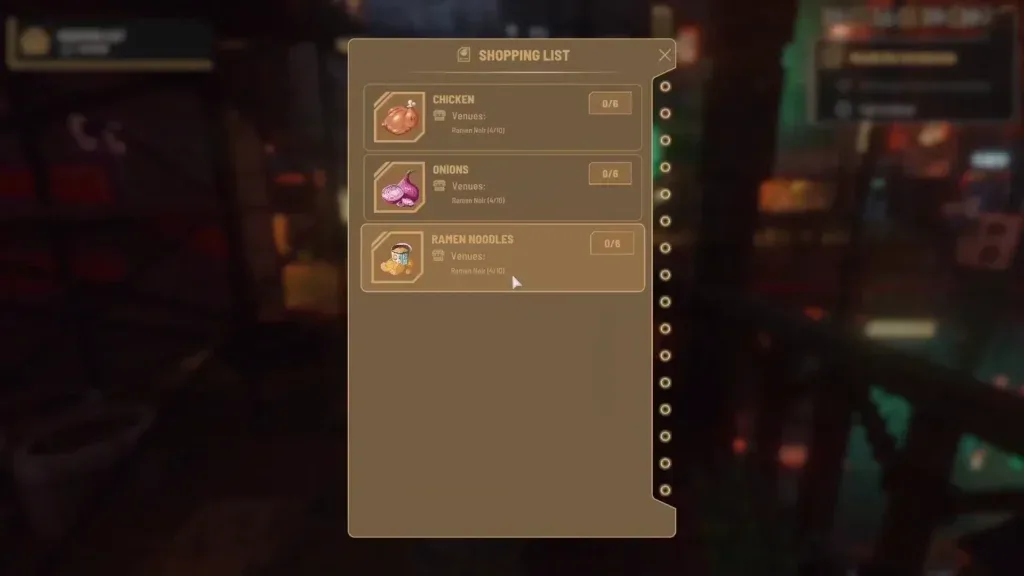
- Keep the menu focused during the comparison. Adding several dishes also adds ingredient demand and makes purchasing behavior harder to interpret.
- Record the venue's starting cash and the ingredients required for the active menu.
- Confirm that an employee is assigned the Manager role and check the schedule you intend to use.
- Let the venue operate for a normal comparison period.
- Review costs, balance, missing ingredients, surplus ingredients, and any spoiled stock.
- Compare those results only after confirming whether the Business level or Manager Efficiency display actually changed.
A focused menu is a risk-control measure, not a proven fix for Manager behavior. It reduces the number of ingredients the system must juggle and makes an incorrect purchase easier to notice. Greenhouse produce can also reduce dependence on Manager purchases for ingredients you can supply yourself, but it does not establish that Efficiency is working correctly.
If the Manager drains cash or buys the wrong stock, take back manual control of critical ingredients. Monitor the shopping list, inspect freshness, and pause reliance on automated purchasing until the venue's balance is stable. Business Skill progression should not be used as a reason to ignore the venue's balance.
The overnight Level 5 issue
An affected launch-build save may show Business Skill moving from Level 1 to Level 5, labeled CEO, after sleeping and starting the next day. The developers have acknowledged this behavior as an issue. If it happens, do not treat the jump as an intended reward, a hidden leveling technique, or confirmation that you completed all normal Business progression.
The most useful response is to preserve clear details and report the problem:
- Note the Business level before sleeping if you can still reproduce the sequence.
- Note the level shown immediately after the new day begins.
- Capture the Business Skill screen and the day transition.
- Record what you did before sleeping, including any venue upgrade or staffing change.
- Include your PC specifications and the steps that led to the jump when submitting a support report.
Nivalis Nights autosaves at the end of each day and also allows manual saving from the Pause Menu during gameplay. A manual save before ending the day gives you a clearer comparison point when investigating an overnight change. It does not guarantee that the bug will be avoided, and you should not assume that every save will reproduce the same result.
There is no announced dedicated fix date or public launch-patch version number in the October 1, 2026 snapshot. Recheck the in-game version and current patch notes before applying launch-day conclusions to a later build.
Business Skill does not repair Manager problems by itself
A higher Business level and a higher Manager Efficiency display may be desirable, but neither should be presented as a confirmed correction for current Manager purchasing problems. Managers can buy too much, fail to buy a needed item, or select inventory that the venue already has. Similar problems have been seen with Managers of different individual levels, so replacing a low-level hire with a higher-level one is not a guaranteed solution either.
Use these operating safeguards while the behavior remains inconsistent:
- Keep the active menu small enough that you can recognize its ingredient demand.
- Check critical ingredients yourself before opening or leaving the district.
- Watch daily costs and balance instead of judging performance only by sales.
- Use greenhouse produce when it matches your menu and reduces purchasing pressure.
- Inspect older stock as well as total quantity, because stock can remain until it spoils.
- Intervene manually when the venue repeatedly runs out of one ingredient or accumulates another.
These steps belong to operational risk control. They do not define how Business Skill XP is earned, and they do not prove what each Efficiency percentage point does.
Reading progress without inventing an unlock table
The Business Skill page does not need a fabricated five-level table. The launch build supports one concrete early comparison at Business Level 2 and also has an acknowledged jump-to-Level-5 issue. Those facts are not enough to assign normal XP requirements, names, bonuses, or unlocks to every level in between.
When you reach a new Business level normally, document only what the interface shows:
- The level before and after the change.
- The Manager Efficiency value before and after.
- Any newly displayed description or unlock.
- Whether the change occurred immediately or after the end-of-day transition.
- The venue and staff state at the time.
Then separate a displayed unlock from an observed operational result. If the interface says Manager Efficiency increased, that is the direct effect you can record. If the venue happened to earn more money that day, profit may also have changed because of customer count, menu composition, wages, ingredient costs, staff happiness, or venue progression. One profitable day does not isolate Business Skill as the cause.
Practical progression priorities
Business Skill is worth monitoring once you are running a venue and especially once a Level 3 venue can employ a Manager. Before that point, the immediate constraints are usually the venue itself: staffing, menu setup, ingredients, cleanliness, and enough cash to operate. Raising a management-related number has limited practical value if the location cannot serve its active menu.
Use this priority order:
- Make the venue operational with a menu you can supply.
- Keep staff roles and schedules understandable.
- Reach the venue requirement for a Manager if automation is your goal.
- Check Business Skill and its displayed Manager Efficiency after normal progression.
- Test automation on a controlled menu.
- Expand only after the venue's stock and balance remain readable.
This sequence does not claim to be the fastest Business Skill grind. It is a safer way to learn what the skill is doing in your save without confusing it with venue upgrades or exposing a profitable business to unreliable automation.
The main takeaway is narrow but useful: Business Skill is its own progression track, Business Level 2 can display 30% Manager Efficiency instead of 0%, and the exact mechanical formula is still unclear. Track the interface, verify results in the venue, and treat an overnight jump to Level 5 as a launch-version bug rather than progression.